Segment + Bento
Forward Segment events directly into Bento with a custom destination so workflows, automations, and LTV calculations stay in sync.
Forward Segment events directly into Bento with a custom destination so workflows, automations, and LTV calculations stay in sync.
Quick facts
- Vendor
- Segment
- Category
- second party
- Tags
- analytics, events, data-pipeline
Requirements
- Active Bento workspace with publishable key, secret key, and site UUID
- Segment workspace with permission to create Destination Functions
- Access to the Segment Functions UI (Connections → Functions)
Overview
Segment already captures granular product events. This integration transforms those events into Bento-friendly payloads so you can:
- Trigger Bento automations the moment a Segment
trackcall fires. - Attach purchase or engagement metadata that updates subscriber fields and lifetime value.
- Keep Zapier/webhook overhead out of the path—Segment sends straight to Bento’s batch event endpoint.
Requirements
- Bento API credentials (Publishable Key, Secret Key) and the Site UUID you want to target.
- Segment plan that enables Destination Functions.
- A quick maintenance window to deploy the new function and add it to your sources.
Installation Steps
- Collect Bento keys – In Bento go to System → API Keys and copy the Publishable Key, Secret Key, and Site UUID.
- Create a Segment Destination Function – In Segment navigate to Connections → Functions → Destinations and click New Function.
- Name and describe the function – e.g., “Bento Destination” so team members know where events flow.
- Add required settings – create string settings named
publishableKey,secretKey, andsiteUuid, then paste the Bento values.
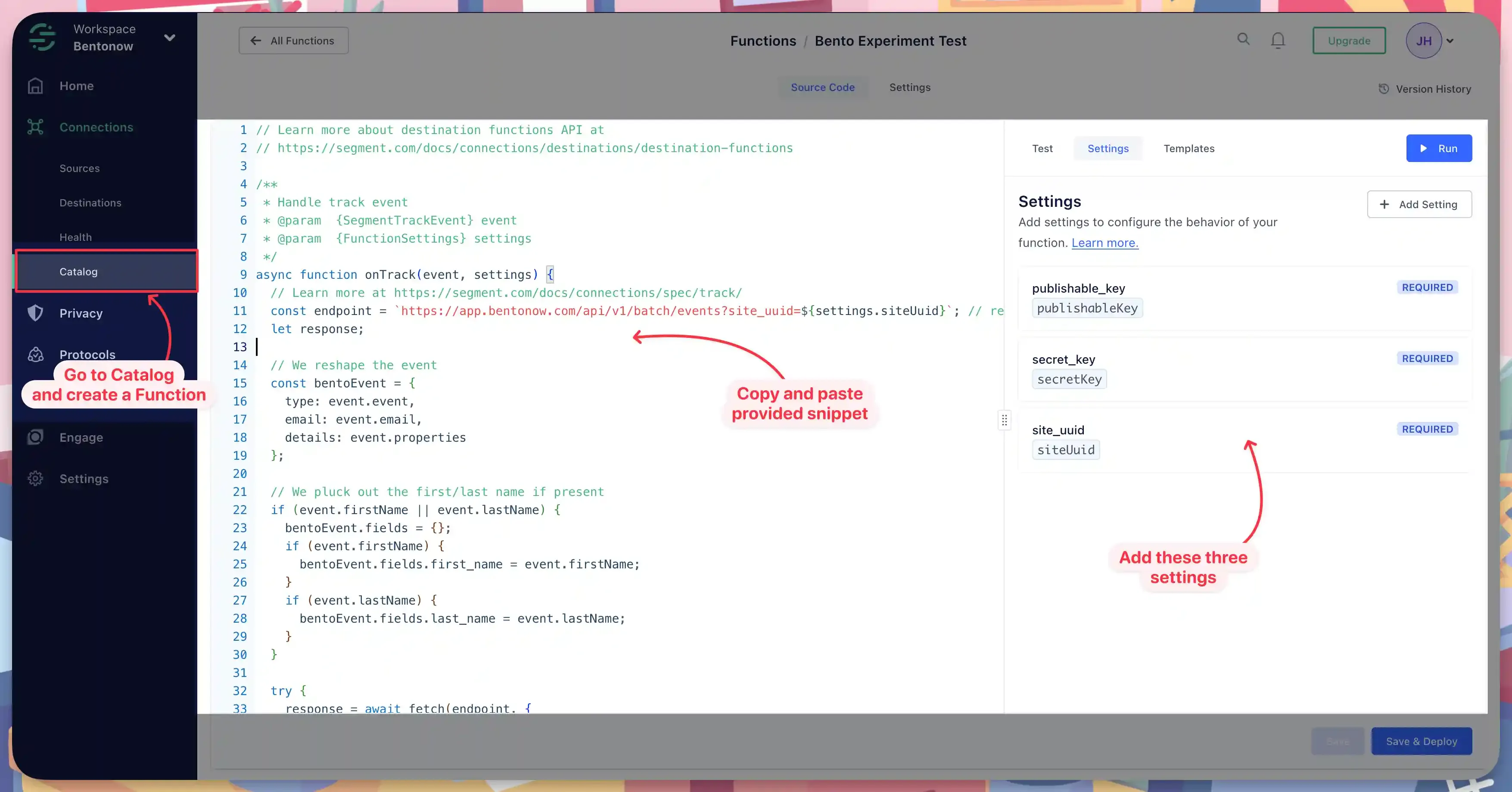
- Paste the Bento handler – replace the default sample with the script below.
- Test and deploy – run the built-in test event, then click Save and Deploy. Finally, add the new destination to any Segment source that should feed Bento.
// Learn more about destination functions API at
// https://segment.com/docs/connections/destinations/destination-functions

/**
 * Handle track event
 * @param  {SegmentTrackEvent} event
 * @param  {FunctionSettings} settings
 */
async function onTrack(event, settings) {
  const endpoint = `https://app.bentonow.com/api/v1/batch/events?site_uuid=${settings.siteUuid}`;
  let response;

  // Reshape the Segment payload into Bento's batch format
  const bentoEvent = {
    type: event.event,
    email: event.email,
    details: event.properties,
  };

  if (event.firstName || event.lastName) {
    bentoEvent.fields = {};
    if (event.firstName) bentoEvent.fields.first_name = event.firstName;
    if (event.lastName) bentoEvent.fields.last_name = event.lastName;
  }

  try {
    response = await fetch(endpoint, {
      method: "POST",
      headers: {
        Authorization: `Basic ${btoa(
          settings.publishableKey + ":" + settings.secretKey
        )}`,
        "Content-Type": "application/json",
      },
      body: JSON.stringify({ events: [bentoEvent] }),
    });
  } catch (error) {
    throw new RetryError(error.message);
  }

  if (response.status >= 500 || response.status === 429) {
    throw new RetryError(`Failed with ${response.status}`);
  }
}

async function onIdentify() {
  throw new EventNotSupported("identify is not supported");
}
async function onGroup() {
  throw new EventNotSupported("group is not supported");
}
async function onPage() {
  throw new EventNotSupported("page is not supported");
}
async function onScreen() {
  throw new EventNotSupported("screen is not supported");
}
async function onAlias() {
  throw new EventNotSupported("alias is not supported");
}
async function onDelete() {
  throw new EventNotSupported("delete is not supported");
}
How the connection works
After you connect the custom destination to a Segment source, every track call is reshaped and authenticated against Bento’s batch events endpoint. Bento ingests the event, ties it to the subscriber (using the email field), and can immediately:
- Trigger flows based on event type (e.g.,
purchase_completed,demo_booked). - Update tags, custom fields, or lifetime value with the metadata you pass through
properties. - Keep reporting dashboards up to date without additional ETL jobs.
Because this runs inside Segment Functions, you control throttling, retries, and deployment within Segment—no need for separate middleware to keep Bento informed.***
Need the original Markdown? Open raw file